
User's Manual






143
WHEN THE
GRAPHIC SYMBOLS
FLASH
2
: Misfeeding in the Automatic Duplexer
1
2
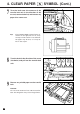
Remove the copy receiving tray.
● If a sorter is attached, first pull it away from
the copier by lifting the release lever.
Open the right-hand and left-hand front
cover.
3
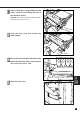
Open the exit cover and remove any misfed
paper.
5
Close the exit cover, then the left-hand and
right-hand front cover.
6
Reinstall the copy receiving tray or the
sorter.
4
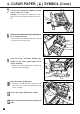
Lower the lower guide of exit side and
remove any misfed paper.
Lower guide of exit side