
Operation Manual




Document and Output Management Functions
2-3
4
Press the Auto Color, Full Color or Black&White key to select a color mode.
5
Complete the scanning settings required for the original.
The following functions are available.
6
Press the Start key. Scanning of the original begins. Display is returned to Document Management
when complete. To continue registering other documents, replace the original and repeat steps 2 to
6.
Printing Documents
Print documents stored in the Shared Data Box as follows.
1
Press the Document Management key.
2
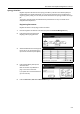
Press [Document Printing] under Shared Data Box.
3
Select the job to reprint and press
[Finish selecting].
NOTE: You can change the document sort order. Press [Order of indication] and select from [Sort
by Date] ([NewJOld] and [OldJNew]) and [Sort by Name] ([AJZ] and [ZJA]).
Press [Document Properties] ([Check/Rev. Details]) to verify details of the selected document. For
further details, refer to Reviewing and Renaming Documents on page 2-4.
4
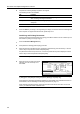
Complete the function settings as required.
The following functions are available.
To change your document selection, press [Select document] and select the document(s) again.
5
Use the numeric keys to enter the copy quantity.
6
Press the Start key. Printing begins.
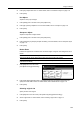
Tab Function
Basic Selection of original sizes, selection of original types, selection of document
sizes, zooming, and original orientation
Quality Scan exposure level, image quality, color balance
†
, hue adjustment
†
,
sharpness
† This setting is available when the color mode is set to Full Color or Auto Color.
Edit Border erase and batch scanning
Document Printing
Order of
Document Management Shared Data Box
Document
Up
Down
Properties
Document Data Box
Doc003
Doc002
Doc001
1 08/08/'05
1 08/08/'05
1 08/08/'05
indication
-
Tab Function
Basic Paper selection, 1-sided/2-sided, sort/offset, stapling
†
† Requires the optional document finisher or 3000 sheet document finisher.
Edit Cover page, booklet, margins, page numbering, output selection
††
†† Requires the job separator, document finisher, or 3000 sheet document finisher.