
Operation Manual




Document and Output Management Functions
2-2
Document Management Functions
Overview of Document Management Functions
Document management functions enable you to store documents (such as scanned images of
originals) on the machine hard disk for printing later.
Documents are assigned to different ‘boxes’, the document storage areas, depending on the
functions to be used. Stored documents are accessible from the boxes where they are kept until
deleted.
The following boxes are available.
Shared Data Box
Save originals as documents in the Shared Data Box to print them later in the desired quantity
without the actual originals. It is particularly convenient to register frequently used formats.
Registering Documents
Register documents in the Shared Data Box as follows. The box can store up to 100 documents.
1
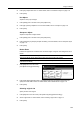
Place the original to be saved as a document and press the Document Management key.
2
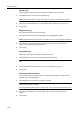
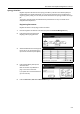
Press [Document Input] ([Document
Registr.]). under Shared Data Box.
3
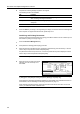
Press [Change Name] and input the
document name.
Refer to Character Input Method on
page 7-47 for how to enter text.
If you prefer not to name the document,
go to the next step.
Box Description Reference
Page
Shared Data Box For storage of documents consisting of scanned originals.
Users can print any number of sets whenever needed.
page 2-2
Synergy Print Box For storage of documents consisting of scanned originals.
Up to ten of these documents can be combined into a single
copy job for printing.
page 2-5
Document Management
Select function.
Document
Shared Data Box
Document Document Document
Synergy Print Box
Box
Editing
Box
Editing
08/0
8
Input Printing Input Printing
Place originals then press Start key.
Document Input
Shared Data Box
Original
11×8½"
Documents
Change
Select
Auto
Reduce
Basic
Quality
Auto size
Select
Regi. Si ze
1 sided
Original
100%
08/0
8
Doc001
Name
Orig.Size Type
/Enlarge
Ready to register doc. ( )Full-Color