
Operation Manual


Troubleshooting
9-17
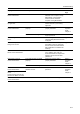
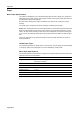
DB Assistant Server error.
Contact administrator.
— An error has occurred with DB
Assistant or the computer running
DB Assistant. Communication
cannot continue. Check the
computer running DB Assistant.
—
DB Assistant Server is in use.
Try again later.
— DB Assistant currently connected to
another scanner. Try connecting
again later.
—
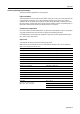
Unable to find FTP server.
Contact administrator.
Is the network cable connected
properly?
Confirm the network cable is
properly connected.
Refer to
Operation
Guide,
Chapter 2
Is the FTP server running? Contact your server administrator or
support personnel.
—
Unable to Log in to the FTP
Server
— FTP server login failed. Make sure
username and password have been
configured.
page 5-26
The Path attempted to use for
saving does not exist
— Save folder does not exist or path to
save folder is incorrect. Verify that
the FTP server save folder and the
path registered in the machine are
matching.
page 5-26
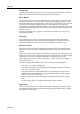
Error occurred at FTP Server
Please contact Administrator
— FTP server returned an unexpected
error. Unable to save. Ask your
server administrator to verify that the
logged in user account has write
permissions.
—
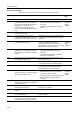
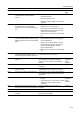
POP3 server not found.
Contact Administrator.
Is the network cable connected
properly?
Confirm the network cable is
properly connected.
Refer to
Operation
Guide,
Chapter 2
Is the POP3 server running? Start the POP3 server. —
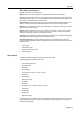
Unable to find POP3 server.
Contact Administrator.
Are the POP3 user account or
password correct?
Verify the POP3 user account and
password.
Refer to
Operation
Guide,
Chapter 2
Unable to Log in to the POP3
Server.
Confirm the login account and
password for SMTP TX authen.
Error occurred at POP3 Server.
Contact Administrator.
— Verify POP3 server settings. —
Display Checkpoints Corrective Actions Reference
Page