
Operation Manual


Troubleshooting
9-12
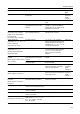
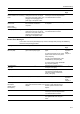
Exceeded print quantity limit. Is the maximum limit for printing as
specified in Job Accounting mode
exceeded?
To perform printing, reconfigure Job
Accounting for the machine.
page 8-4
Error has occurred. Change to
printer screen and check.
— Shown when a printer error has
occurred when other modes are
currently being displayed. Press the
Printer key to switch to the printer
screen and display the specific error
message.
—
RAM disk error Press GO.
Code: ##
— (For further details, refer to RAM
Disk Error on page 9-14.)
page 9-14
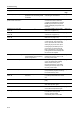
Memory Card error Press GO.
Code: ##
— (For further details, refer to Memory
Card Errors on page 9-14.)
page 9-14
HARD DISK error Press GO.
Code: ##
— (For further details, refer to Hard
Disk Errors on page 9-14.)
page 9-14
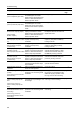
KPDL error Press GO. — Unable to continue processing
current print job. From the printer
menu, open KPDL Error Print and
select [On] to print an error report.
Press [GO] to print data up to the
point of error. If resume time has
been configured for Auto Continue,
printing resumes automatically after
the set time has elapsed.
page 3-11
Memory card error Insert again. Was the memory card
(CompactFlash) removed during
printer configuration?
Insert the memory card. When
inserting the memory card, turn off
the main power switch.
page 3-27
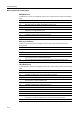
Insert the same Memory card. — Memory card (CompactFlash) could
not be recognized when reading
data from the memory card.
Re-insert the memory card. When
inserting the memory card, turn off
the main power switch.
page 3-27
Format error Memory card. — The inserted memory card
(CompactFlash) requires formatting.
Format the memory card.
page 3-27
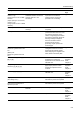
Option interface error
Code: ##
Is the installed option interface slot
incorrect?
Switch the main power switch to off
({ position) and install in the correct
slot.
—
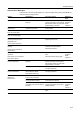
File not found Press GO. — A file error has occurred. Press
[GO].
—
Read Fonts: Failed — Unable to read font data. Try the font
data read operation again.
page 3-29
Read macro: Failed
— Unable to read macro data. Try the
macro data read operation again.
page 3-29
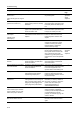
Warning Low memory. — Memory is low. Print the status page
to confirm the current printer
memory capacity. Delete
unnecessary font or macro data.
—
Display Checkpoints Corrective Actions Reference
Page