
Operation Manual





Troubleshooting
9-5
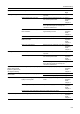
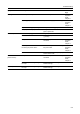
Printing is wrinkled. Is the separator dirty? Clean the separator. Refer to
Operation
Guide,
Chapter 5
Is the copy paper damp? Replace the copy paper with new paper. Refer to
Operation
Guide,
Chapter 2
Is special color copy paper being used? Use special color copy paper. —
Is the paper set in a proper orientation? Change the orientation in which the
paper is positioned.
—
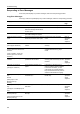
Unable to print. Is the machine plugged in? Plug the power cord into an AC outlet. —
Is the machine switched on? Turn the main power switch to on
( | position).
—
Is the printer cable connected? Confirm the printer cable is securely
connected.
Refer to
Operation
Guide,
Chapter 2
Was the printer switched off when
connecting the printer cable?
Switch on the printer after connecting
the printer cable.
Refer to
Operation
Guide,
Chapter 2
Is the device in Offline mode? Press the Printer key and press [GO] to
restore Online mode.
—
Characters are not
printed correctly.
Is the printer cable connected? Confirm the printer cable is securely
connected.
Refer to
Operation
Guide,
Chapter 2
Are the computer settings configured
correctly?
Confirm printer driver and application
software settings.
—
Print output is not correct. Are the computer settings configured
correctly?
Confirm printer driver and application
software settings.
—
Symptom Checkpoints Corrective Actions Reference
Page