
Operation Manual







Troubleshooting
9-4
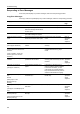
Printer output is fuzzy. Is the printer in a high humidity
environment?
Perform a drum refresh. page 7-36
Is the copy paper damp? Replace the copy paper with new paper. Refer to
Operation
Guide,
Chapter 2
Is special color copy paper being used? Use special color copy paper. —
Printing is skewed. Are the originals loaded correctly? When placing originals on the platen,
place them face-down and flush against
the original size indicator plates.
Refer to
Operation
Guide,
Chapter 2
When placing originals in the document
processor, align the original width
guides securely before placing the
originals.
Refer to
Operation
Guide,
Chapter 2
Is the paper loaded correctly? Check the position of the paper width
guides.
Refer to
Operation
Guide,
Chapter 2
Paper jams frequently
occur.
Is the paper loaded correctly? Load the paper correctly. Refer to
Operation
Guide,
Chapter 2
Is the paper of the supported type? Is it
in good condition?
Remove the paper from the cassette,
turn it over, and reload it.
Refer to
Operation
Guide,
Chapter 2
Is the paper curled, folded, or wrinkled? Replace the paper with new paper. Refer to
Operation
Guide,
Chapter 2
Are any loose scraps of paper or is
there any jammed paper inside the
device?
Remove any jammed paper. Refer to
Operation
Guide,
Chapter 6
Is the copy paper damp? Replace the copy paper with new paper. Refer to
Operation
Guide,
Chapter 2
Is special color copy paper being used? Use special color copy paper. —
Copies from the optional
document processor
have black lines.
Is the slit glass dirty? Clean the slit glass. Refer to
Operation
Guide,
Chapter 5
Copies from the 3000
sheet document finisher
are curled.
— Remove the paper from the cassette,
turn it over, and reload it.
Refer to
Operation
Guide,
Chapter 2
Symptom Checkpoints Corrective Actions Reference
Page