
Operation Manual




Troubleshooting
9-3
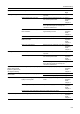
Printing is too light. Is Auto Exposure mode set? Set the correct exposure level for auto
exposure.
page 7-7
Is Manual Exposure mode set? Use the exposure adjustment key to set
the correct exposure level.
Refer to
Operation
Guide,
Chapter 3
When changing the default exposure
level, adjust the exposure manually and
choose the desired level.
page 7-8
Is the toner distributed evenly within the
toner container?
Shake the toner container up and down
approximately 10 times.
Refer to
Operation
Guide,
Chapter 5
Is EcoPrint is enabled? Set EcoPrint to [Off]. page 1-43
Is there a message indicating the
addition of toner?
Replace the toner container. Refer to
Operation
Guide,
Chapter 5
Is the copy paper damp? Replace the copy paper with new paper. Refer to
Operation
Guide,
Chapter 2
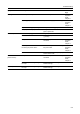
Printing is too dark. Is Auto Exposure mode set? Set the correct exposure level for auto
exposure.
page 7-7
Is Manual Exposure mode set? Use the exposure adjustment key to set
the correct exposure level.
Refer to
Operation
Guide,
Chapter 3
When changing the default exposure
level, adjust the exposure manually and
choose the desired level.
page 7-8
Copies have a moire
pattern (dots grouped
together in patterns and
not aligned uniformly).
Is the original a printed photograph? Set the image quality to [Print]. Refer to
Operation
Guide,
Chapter 3
Color of original and copy
not the same.
Are image adjust settings appropriate? Perform color balance adjustment. page 1-49
Perform automatic gray adjustment. page 7-31
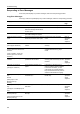
Copies are not clear. Did you choose appropriate image
quality for the original?
Select an appropriate Image Quality
mode.
Refer to
Operation
Guide,
Chapter 3
Is the copy paper damp? Replace the copy paper with new paper. Refer to
Operation
Guide,
Chapter 2
Is special color copy paper being used? Use special color copy paper. —
Copies are dirty. Are the original platen or platen dirty? Clean the original platen or platen glass. Refer to
Operation
Guide,
Chapter 5
Symptom Checkpoints Corrective Actions Reference
Page