
Operation Manual



Job Accounting
8-15
3
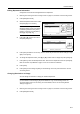
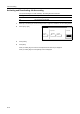
Select the ID-code of the department
and press [Total].
NOTE: In the list, ---ETC indicates the number of printouts delivered without entering an ID-code.
The printouts include the following documents:
- Various reports
- Reports for printing errors
- Printouts from computers of which the department ID-codes are not specified (if Printing from
Unregistered Sources (Printer) is enabled in the job accounting default settings)
You can change the department display order. Press [Order of indication] and select from [Sort by
Code] ([1J9] and [9J1]) and [Sort by Name] ([AJZ] and [ZJA]).
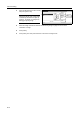
4
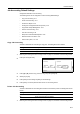
The usage count for the selected
department is displayed for your
reference.
NOTE: The copy limitation per
department is given in parentheses
after the current volume, as in 1,234
(999,999).
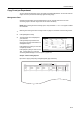
5
To reset the usage count, press [Counter clear].
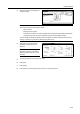
6
Press [Yes].
7
Press [Close].
8
Press [Close]. The touch panel will return to the Job Accounting screen.
ent Total
Close
Order of
Job
Up
Down
Total
1st sales division
2nd sales division
ETC
3rd sales division
-
1
1
2
2
3
3
indication
System Menu
Each Management Total
Number print.
Black & White:
Copy
Scan. Transm.
Scan # pages:
scanner
Printer Total
Job Accounting
Nu
is l
-
Monocol or :
Full-color:
Total:
.1,234 .5,678 .6,912
.0 ------- .0
.1,000 .234 .1,234(999,999)
.2,234 .5,912 .8,146
Fax Tx.
Fax
.1,234 -------Trsm. # pages:
Mi nsCommun.Time: --Hrs---
11111111 1st sales divisi
o