
Operation Manual




System Menu
7-48
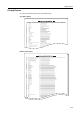
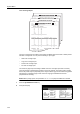
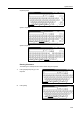
Capital keyboard
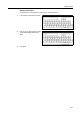
Numeral/Symbol keyboard
Metric Models
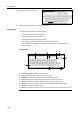
Keyboard
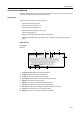
1 Character display: Displays the characters entered.
2 [Capital]: Press this key to enter capital letters.
3 [Letter]: Press this key to enter lowercase letters.
4 [Symbol 1]: Press this key to enter the numeric and symbols.
5 [Symbol 2]: Press this key to enter other symbols.
6 [Space]: Press this key to enter a space.
7 [AllDel.]: Press this key to delete all characters entered.
8[][]: Press these keys to move the cursor left and right.
9 [Del. prev]: Press this key to delete the character to the left of the cursor.
10 [Stop]: Press this key to return to the previous screen.
11 [End]: Press this key to confirm the characters you entered.
Name to display
End
Capital
Stop
Letter Num./Sym. Space
Char.Limit:32 letters including #
AllDel. Del. prev
End
Name to display
Capital
Stop
Letter Num./Sym. Space
Char.Limit:32 letters including #
AllDel. Del. prev
End
Name to display
Capi tal
Stop
Letter Symbol 1 Space
Char.Limit: 32 letters inc. # key
AllDel. Del. prev
Symbol 2
1
2 3 4 5
7 8 10 11
9
6