
Operation Manual


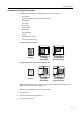




Copy Functions
1-13
3
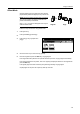
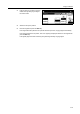
Press [2 holes] or [3 holes] for the inch
model. Press [2 holes] or [4 holes] for
the metric model.
4
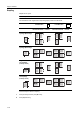
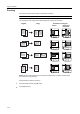
Select the hole punch position.
5
Place the original and press the Start key.
If the original has been placed on the optional document processor, copying begins automatically.
If the original is placed on the platen, Scan next original(s) is displayed. Place the next original and
press the Start key.
If all original pages have been scanned, press [Scanning finished]. Copying begins.
Back
Select Original I
Direction.
Top Edge
Staple/Punch
Paper Size
Shortcut
1 staple
Staple
100%
Ready to copy. ( )Full-Color
2 staples
Off
2 holes
Off Left side
Right side
Top side
Punch Position
11×
8
3 holes