
Operation Manual



System Menu
7-12
3
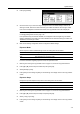
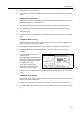
Current functions are shown in Register
Mode and Addition Mode shows
available functions that can be
substituted for the current functions.
Under Addition Mode, press [S] or [T]
to select the function to change. Under
Register Mode, press [S] or [T] to
select the function that is to be added
and press [] to move the function.
The number in Register Mode corresponds to the display position number (left side of the screen).
4
Press [Close] to save settings or [Back] to cancel settings. The display returns to the Copy Default
screen.
e
r Choice)
CloseBack
Register Mode
Mar gi n
Border Er ase
Combine
Page #
Booklet
Cover
Copy Default
Addition Mode
Off
Select Paper
Original size
Combine
Batch Scanning
Margin
-