
Operation Manual



System Menu
7-4
Original Image Quality
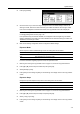
Set the original image quality for default settings mode. The setting items are as follows.
1
Referring to Accessing the Copy Default screen on page 7-2, access the Copy Default screen.
2
Press [S] or [T] to select Original Image Quality and press [Change #].
3
Select [Text+Photo], [Photo], [Print], [Text] or [Map].
4
Press [Close] to save settings or [Back] to cancel settings. The display returns to the Copy Default
screen.
Color Mode Setting
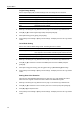
Set the color mode for default settings mode. The setting items are as follows.
1
Referring to Accessing the Copy Default screen on page 7-2, access the Copy Default screen.
2
Press [S] or [T] to select Auto Color/Full-Color/B&W (Auto Colour/full col./B&W) and press
[Change #].
3
Select [Auto color] ([Auto colour]), [Full color] ([Full colour]), or [Black&White] ([Black white]).
4
Press [Close] to save settings or [Back] to cancel settings. The display returns to the Copy Default
screen.
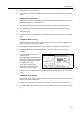
Setting Auto Color Detection
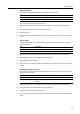
Adjust the color and black&white detection level for auto color copy mode. Reduce the value to
detect more color originals. Increase the value to detect more black&white originals.
1
Referring to Accessing the Copy Default screen on page 7-2, access the Copy Default screen.
2
Press [S] or [T] to select Auto Color Correction (Auto colour Correction) and press [Change #].
3
Press [W] or [X] to adjust the value.
4
Press [Close] to save settings or [Back] to cancel settings. The display returns to the Copy Default
screen.
Item Description
Text+Photo Appropriate for mixed text and photo originals.
Photo Appropriate for photo originals taken with a camera.
Print Appropriate for photo originals from magazines or printed media.
Text Appropriate for document originals with large amounts of text.
Map Appropriate for map originals.
Item Description
Auto color (Auto colour) Automatically detects color and black and white originals and copies
color originals in color and black and white originals in black and white.
Full color (Full colour) Copies all originals in full color.
Black&White (Black white) Copies all originals in black and white.