
Operation Manual






Copy Functions
1-8
4
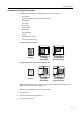
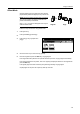
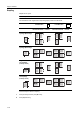
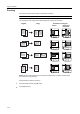
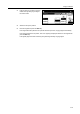
According to the placed orientation of
the original, press [Top Edge] ([Back
Edge]) or [Left Top Edge] ([Left top
corner]).
5
Press [Close].
6
Configure the functions which require specification of the original orientation, such as Duplex mode.
7
Press the Start key. Copying begins.
Set
Back
Left Top
Select Original Image
Direction.
Top Edge
Close
t
ion
Paper Size
"Select Original Image Direction." can
be shown at right side of display.
Follow the steps. If setting mode is
wrong, incorrect copy will result.
Shortcut
100%
to copy.
Edge
( )Full-Color
11×8½"