
Operation Manual





Copy Functions
1-7
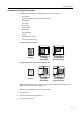
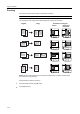
Orientation of Original Document
Orientation of the original must be specified to to use the following functions.
•Duplex Mode
• Split Mode (separate copies from two-sided originals)
• Margin Mode
• Auto Center
• Border Erase
• Combine Mode
• Memo Pages
• Page Numbering
•Booklet
• Stapling (optional feature)
• Punching (optional feature)
Placing originals on the platen
Placing originals in the optional document processor
NOTE: The default setting for the original orientation may be changed. For further details, refer to
Orientation of Original Document on page 7-20.
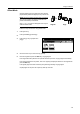
Follow the steps as below to specify the original orientation.
1
Place the original.
2
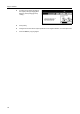
Press [Function] and then press [T Down].
3
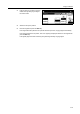
Press [Orig. Set Direction].
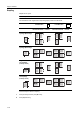
Original [Top Edge]
([Back Edge])
[Left Top Edge]
([Left top corner])
Original [Top Edge]
([Back Edge])
[Left Top Edge]
([Left top corner])