
Operation Manual





Included Scanner Utilities
6-28
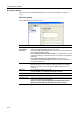
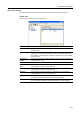
Destination Editing (Scan to PC)
Display or edit destination PC addresses.
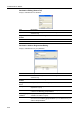
Destination Address Registration/Editing
Display or edit destination PC group addresses.
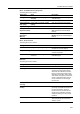
Item Description
Name Field to enter the Registration Name. Enter a registration name less than 16
characters long.
Registration
Number
Enter the destination PC registration number.
PC address Enter the hostname or IP address of the destination PC.
Save number Enter the save destination folder number.
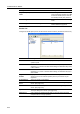
Item Description
Name Field to enter the Registration Name. Enter a registration name less than 16
characters long.
Registration
Number
Enter the destination PC registration number.
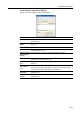
Change Password
Button
Change the password for the PC group address.
Group members Displays the names, registration numbers, and PC addresses of members
registered to a group.
Delete Button Removes the selected address as a member of a group. The deleted address
is added to the Auxiliary group members.
Auxiliary group
members
Displays the names, registration numbers, and PC addresses of members
available to be added to a group.
Add Button Adds the selected address as a member of a group. The added address is
removed from the Auxiliary group members. Up to 30 addresses may be
added to Group members.