
Operation Manual






Copy Functions
1-6
Copy Quantity
Sets the number of sheets to copy. You may specify up to 999 sheets for a single copy job.
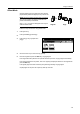
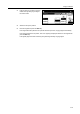
Follow the steps as below to specify the copy quantity.
1
Place the original.
2
Use the numeric keys on the operation
panel to enter the desired copy quantity.
NOTE: To clear the copy quantity,
press the Stop/Clear key. Copy
quantity will be reset to 1.
3
Press the Start key. Copying begins.
Paper Size Set
Combine
Sheet
Mar gi n/
Centering
Color func.FunctionUser choice
MP tr ay
Plain
APS
Auto %
Reduce
100%
Exposure
Auto
Staple
Staple
Left Top
Staple Off
100%
Exposure
/Enlarge Mode
Erase
Program
to copy. ( )Full-Color
11×8½"