
Operation Manual





Included Scanner Utilities
6-23
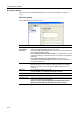
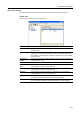
Sender Address Registration (Editing)
Register a new sender address or edit a sender address.
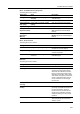
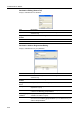
Item Description
Name Field to enter the Registration Name. Enter a registration name less than 16
characters long.
Registration
Number
Enter the sender data registration number. Specify a registration number from
001 - 040.
E-mail Address Enter the sender e-mail address.
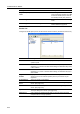
Signature Enter signature data to be attached during e-mail transmission. Enter text less
than 256 characters long.
Address of PC with
“Address Book”
installed
Enter the address of the PC on which Address Book is installed.
Save number Specify the PC save number for the destination PC for Scan to PC mode.
Specify a save number from 001 - 100.
Change Password
Button
Change the password of each user. Enter a numerical password less than 8
digits long.
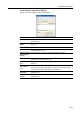
SMTP TX
Authentication
Button
Configure SMTP authentication settings for each user.
When specifying SMTP authentication for each user, first configure SMTP
Authentication in System Basic Setting. (See page 6-17)
Add to Destination
List (E-mail)
When this item is checked, the sender (user) address is added to the E-mail
Destination List.
Add to Destination
List (PC)
When this item is checked, the sender (user) address is added to the PC
Destination List.