
Operation Manual





Included Scanner Utilities
6-20
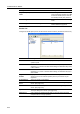
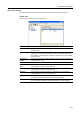
IP-Filter Tab Selection
NOTE: For further details on IP-Filter and configuration, refer to IP-Filters on page 5-9.
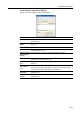
Scanner Default
Configure image scanning related default settings for the scanner. The settings items are Basic
Setting and Extension Setting. Click Extension button to show extended settings.
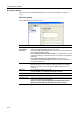
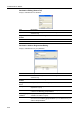
Basic - Black and White mode
The setting items are as follows.
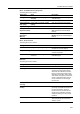
Item Description
Item Check the item for which you would like to perform filtering.
Use the same IP
Address for all
items
For all Items with a check, enables the same IP address set in Set Allowed
IP Address Range (IP Address).
Set Allowed IP
Address Range
(IP Address)
Up to 4 IP address ranges can be enabled for filtering. To filter a single IP
address, only enter the Starting Address.
Setting Item Value Description
File Type TIFF/PDF Specify the file type when saving a
scanned image.
Orig. image
quality
Photo/Text/Text+Photo/OCR Select from the following four modes
depending on the type of original being
scanned.