
Operation Manual


Included Scanner Utilities
6-11
File Names
When saving data files at the computer, the details configured in advance from the web browser are
added to the filename (character string less than 16 characters + file extension). If not specified, the
filename will be automatically determined based on predefined rules. The file naming convention for
automatic naming is as follows.
Filename: *******nnnn_mmm.extension
IMPORTANT: When the number for the auto-naming rule conflicts with a same file name range or
same file name, and the Setup dialog box Permit File Overwrite is checked (see page 6-7), the
older existing files is overwritten by newly saved files.
About Image Data
• File Type
JPEG, TIFF and PDF
†
formats are supported.
NOTE: The JPEG format is available when scanning in Full color or Auto color mode. Auto Color is
available only when [Gray scale] is selected for B&W Setting.
• Image data size
Standard sizes: A3, A4, A5, B4, B5, B6, 11 × 15", Folio, 11 × 17", 8 1/2 × 11", 8 1/2 × 14",
5
1/2 ×81/2", 8 1/2 ×13", 81/2 ×131/2", 8K, 16K
Non-standard sizes: 50 - 432 mm (17") width, 50 - 297 mm (A4 Long) height.
NOTE: When receiving multiple page image data, the import size cannot be modified for each
individual page. (Except when Batch scanning is set)
• Resolution (DPI)
The four resolutions of 200 × 200 dpi, 300 × 300 dpi, 400 × 400 dpi, 600 × 600 dpi are
supported.
NOTE: When receiving multiple page image data, the resolution cannot be modified for each
individual page. (Except when Batch scanning is set)
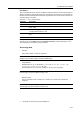
Text String Description
******* Filename stored in each scanner.
nnnn Indicates the document scan number, represented by a 4 digit number between
0000 - 9999.
mmm Used for each page when saving an original with multiple pages, represented by
a 3 digit number between 0 - 999.
Extension Extension is automatically assigned by Scanner File Utility depending on the file
type.
† Using PDF conversion library by HyperGEAR, Inc.