
Operation Manual



Included Scanner Utilities
6-4
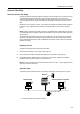
2. Register save destination computer using Address Editor, Address Book for Scanner, or a web
browser
3. Scan the original
4. Transmit scanned data
5. Receive image data into the save folder
Installing and Uninstalling
Installing Scanner File Utility
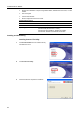
1
Click Scanner Utilities from the Software Library
CD-ROM main menu.
2
Click Scanner File Utility.
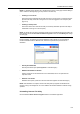
3
Follow the wizard to complete the installation.
Operating Environment
Hardware IBM PC/AT Compatible
Interfaces 10BASE-T/100BASE-TX
Operating System Windows NT 4.0 (Service Pack 5 or later),
Windows 2000 (Service Pack 2 or later),
Windows 98 (Second Edition), Windows 95 (OSR2),
Windows Me, Windows XP, Windows Server 2003