
Operation Manual







Copy Functions
1-2
Selecting Paper Source
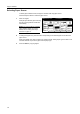
To select paper of different sizes, change the cassette or MP tray paper source.
Follow the steps as below to select the paper source.
1
Place the original.
When [APS] is selected, paper matching
the size of the original will be selected
automatically.
NOTE: You may override the automatic
paper selection default. For further
details, refer to Setting Auto Paper
Selection on page 7-5.
2
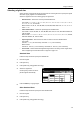
To change the paper size, press the button corresponding to the desired paper size to select that
paper source.
When using the MP tray, refer to Chapter 2 of Operation Guide: Setting Paper Type and Size for the
Cassettes and MP Tray to set the paper size and paper type.
3
Press the Start key. Copying begins.
Paper Size
Color func.FunctionUser choice
Basic
Plain
11×17"
Color
11×8½"
Plain
11×8½"
Plain
MP tr ay
Plain
APS
Auto %
Reduce
100%
Exposure
Auto
Staple
Staple
Left Top
Staple Off
100%
Exposure
/Enlarge Mode
Program
Ready to copy. ( )Full-Color
11×
8
11×8½"