
Operation Manual



Setting Scanner from a Web Browser
5-12
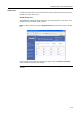
Extension
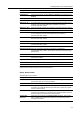
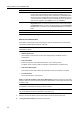
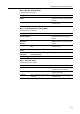
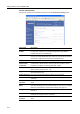
The setting items are as follows.
Setting Item Value Description
Centering On, Off When scanning with zoom, by
specifying the Original size and the
Send size, blank borders around the
bottom or left and right will be shown
depending on the sizes. When setting
Auto Center, the image is moved to the
center so that blank borders around
the top and bottom or left and right
become even.
Continuous
sending
On, Off Use the same settings from a
previously completed transmission for
the next transmission. The scan
function screen is returned with the
sender (user), destination and other
settings remaining from the previous
operation.
File name Input Manual, Auto/Manual Displays the filename input box
without displaying the auto/manual
selection screen.
Skip sender (user)
select
On, Off When using this scanner, a sender
(user) must be first selected. Set to On
to force the sender (user) to User No.
001 and skip sender (user) selection.
Color setting Auto color, Full-color, Black/White Set the color mode for default settings
mode.
B&W setting Black&White, Grayscale When scanning in B&W, select
between B&W and grayscale.
Enter E-mail
address
On, Off When Send E-mail, specify whether to
directly enter the mail address when
selecting recipients.
One page per file On, Offf Creates and sends a separate file for
each page of a scanned original.