
Operation Manual




Scanner Settings
4-14
3
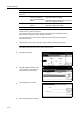
Press [Lighter] or [Darker] to adjust the density.
4
Press [Close]. The display returns to the Setting default function screen.
File Type
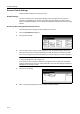
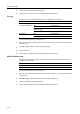
Configure the file type for default settings mode. The setting items are as follows.
For further details about file type, see page 4-5.
1
Referring to Accessing the Setting default function Screen on page 4-12, access the Setting default
function screen.
2
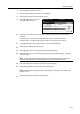
Press [S] or [T] to select File Type and press [Change #].
3
Select the file type.
4
Press [Close]. The display returns to the Setting default function screen.
PDF/TIFF/JPEG Quality
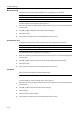
Configure the image quality for [PDF], [TIFF] or [JPEG] file types for default settings mode. The
setting items are as follows.
For further details about file type, see page 4-5.
1
Referring to Accessing the Setting default function Screen on page 4-12, access the Setting default
function screen.
2
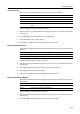
Press [S] or [T] to select PDF/TIFF/JPEG Qual. and press [Change #].
3
Press [Low] or [High] to adjust image quality.
4
Press [Close]. The display returns to the Setting default function screen.
Item Description
Full-Color B&W&Gray
(Full-Colour B&W&Grey)
PDF Configures PDF.
TIFF Configures TIFF.
JPEG Color&Gray
(JPEG Col. Gray)
Configures JPEG Color/Grayscale.
HiComp. PDF Color Configures High compression color PDF.
Black&White PDF Configures PDF.
TIFF Configures TIFF.
Item Description
Low Sets low quality (high compression).
High Sets high quality (low compression).