
Operation Manual




Printer Settings
3-47
3
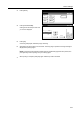
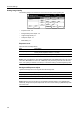
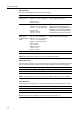
Press [Others].
4
Press [Print HEX-DUMP].
Printing mode with dump Rx data. Are
you sure? is displayed.
5
Press [Yes].
Processing is displayed, followed by Page remaining.
6
Send data to this device while it is in this state. The dump page is printed. Processing message is
displayed and printing begins.
NOTE: Press [GO] to take this device offline after the needed dump page has been printed, then
press [Cancel] to cancel printing of any more dump pages.
7
When printing is complete, press [GO] again. HEX Dump mode is canceled.
Page Set
Print
Paper
RAM DI SK
Mode
Close
item.
Font
Color Mode
Handling
Quality
Others
Close
Off
Service
Printer
Val ue
I
tem
i
me Out
tect
e
o
r
Permanent
Reset
Print
HEX-DUMP
30.
Change #
Sec.