
Operation Manual




Printer Settings
3-46
5
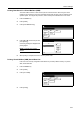
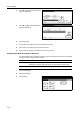
Press [Print Status Page].
6
Press [Printing].
Processing message is displayed and printing of the service status page begins.
7
When printing is complete, the screen returns to printer mode.
Printer Reset (Reboot)
Reset the printer function only without switching off ({ position) the main power switch.
1
Press the Printer key.
2
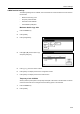
Press [Printer Menu].
3
Press [Others].
4
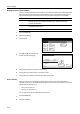
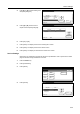
Press [Printer Reset].
Only printer board is working without
turning off the main SW. Are you sure?
is displayed
5
Press [Yes]. The printer board reboots.
Dump Received Data
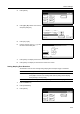
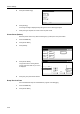
Print a hexadecimal output of received data for program or file debugging.
1
Press the Printer key.
2
Press [Printer Menu].
Print Sta-
A4
Standard
Service
tus Page
sizes
Paper Feed
Operation
Printer menu Others-
Page Set
Print
Paper
RAM DI SK
Mode
Close
item.
Font
Color Mode
Handling
Quality
Others
Close
Off
Service
Printer
Value
I
tem
i
me Out
o
tect
e
o
r
Permanent
Reset
Print
HEX-DUMP
30.
Change #
Sec.