
Operation Manual




Printer Settings
3-45
4
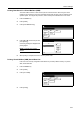
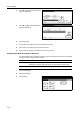
Press [S] or [T] to select Finishing Error
and press [Change #].
5
Press [S] or [T] to select Proces.
Duplex Print and press [Change #].
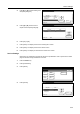
6
Press [On] or [Off].
7
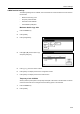
Press [Close]. The display returns to the Finishing Error screen.
8
Press [Close]. The display returns to the Others screen.
9
Press [Close]. The display is returned to the Printer menu screen.
Service Settings
Used mainly for maintenance purposes by the service representative. Use to print a service status
page for reference during maintenance or service.
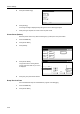
1
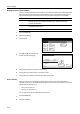
Press the Printer key.
2
Press [Printer Menu].
3
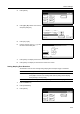
Press [Others].
4
Press [Service].
Others
Printer menu
Off
Service
ValueSetti ng Item
Form Feed Time Out
Resour ce Protect
Auto Continue
Finishing Error
Permanent
30.
Change #
Sec.
Finishing Error
Change #
Setting Item
Staple Mode
LF Action
Value
Proces. Duplex print On
On
Printer menu Others-
Page Set
Print
Paper
RAM DI SK
Mode
Close
item.
Font
Color Mode
Handling
Quality
Others
Others
Printer menu
Off
Service
ValueSetti ng Item
Form Feed Time Out
Resour ce Protect
Auto Continue
Finishing Error
Permanent
30.
Change #
Sec.