
Operation Manual




Printer Settings
3-44
4
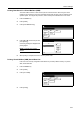
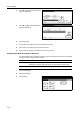
Press [S] or [T] to select Finishing Error
and press [Change #].
5
Press [S] or [T] to select Staple Mode
and press [Change #].
6
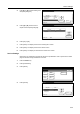
Press [On] or [Off].
7
Press [Close]. The display returns to the Finishing Error screen.
8
Press [Close]. The display returns to the Others screen.
9
Press [Close]. The display is returned to the Printer menu screen.
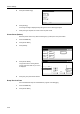
Setting Duplex Mode Printing Error Detection
For duplex mode printing, set whether to detect the paper size and type and show an error message
for paper that does not support duplex printing.
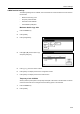
1
Press the Printer key.
2
Press [Printer Menu].
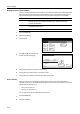
3
Press [Others].
Others
Printer menu
Off
Service
Val ueSetting Item
Form Feed Time Out
Resource Protect
Auto Continue
Finishing Error
Permanent
30.
Change #
Sec.
Finishing Error
Change #
Setting Item
Staple Mode
LF Action
Val ue
Proces. Duplex print On
On
Printer menu Others-
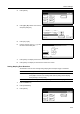
Mode Description
On Displays an error message.
Press [GO] to continue single side printing. Press [Cancel] to cancel printing.
Off Continues 1-sided printing without showing an error message.
Page Set
Print
Paper
RAM DI SK
Mode
Close
item.
Font
Color Mode
Handling
Quality
Others