
Operation Manual




Printer Settings
3-41
Other Settings
The following items can be set for other settings.
• Form Feed Timeout
• Setting Resource Protect Mode
• Auto continue
• Setting Stapling Error Detection
• Setting Duplex Mode Printing Error Detection
• Service Settings
• Printer Reset (Reboot)
• Dump Received Data
Form Feed Timeout
After receiving the last data from the computer, and if no response is received from the computer
indicating the data transmission has ended, this device will wait a predetermined time before
printing the last page. After this predetermined time, the page will be fed automatically. Set the form
feed timeout to ‘0’ to prevent form feed until [GO] is pressed manually.
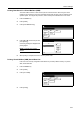
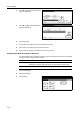
1
Press the Printer key.
2
Press [Printer Menu].
3
Press [Others].
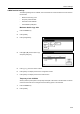
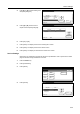
4
Press [S] or [T] to select Form Feed
Time Out and press [Change #].
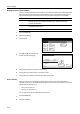
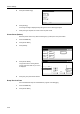
5
Press [+] or [–] to set the form feed wait time.
6
Press [Close]. The display returns to the Others screen.
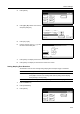
7
Press [Close]. The display is returned to the Printer menu screen.
Page Set
Print
Paper
RAM DI SK
Mode
Close
item.
Font
Color Mode
Handling
Quality
Others
Others
Printer menu
Off
Service
ValueSetti ng Item
Form Feed Time Out
Resour ce Protect
Auto Continue
Finishing Error
Permanent
30.
Change #
Sec.