
Operation Manual





Printer Settings
3-30
4
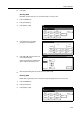
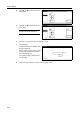
In the Delete area, press [Data],
[Program], [Font], [Macro] or
[Language].
5
Press [S] or [T] to select the item to
delete and press [Delete].
Processing message is displayed and
data is deleted from the memory card.
6
The screen returns to printer mode when done deleting.
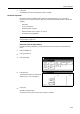
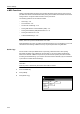
Print List of Partitions
Print the memory card contents (data names, data size, etc.) as a partition list.
1
Press the Printer key.
2
Press [Printer Menu].
3
Press [Memory Card].
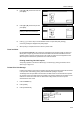
4
Press [List of Partitions].
Close
List of
Read
Delete
Off
Partitions
Write Data
Format
Data Program Data Program
Font Macro Font Macro
Language
Cancel
Memory Card
Delete
Up
D
ata
-
Down
Printer menu
Print Sta-
tus Page
Interface
Emulation
Page Set
Print
Paper
RAM DI SK
Mode
Select item.
Font
Color Mode
Handling
Quality
Others
Memory
Card
Memory Card
List of
Read
Delete
Printer menu
Partitions
Write Data
Format
On
Data Program Data
Font Macro Font
Language