
Operation Manual




Printer Settings
3-23
Paper Handling
Set the following items for setting paper handling.
• MP Tray mode specification
• Feed Select
• Duplex Print Mode Setting
• Paper Output Select
• Shared A4/Letter Size Feed Select
MP Tray mode specification
Set the paper handling method for the MP Tray.
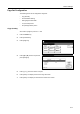
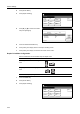
1
Press the Printer key.
2
Press [Printer Menu].
3
Press [Paper Handling].
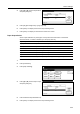
4
Press [S] or [T] to select Multipurpose
tray mode, and press [Change #].
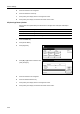
5
Press [Cassette] or [First].
6
Press [Close]. The display returns to the Paper Handling screen.
7
Press [Close]. The display is returned to the Printer menu screen.
Feed Select
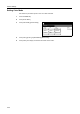
Sets Feed Select. If a paper feed source is not specified at the application (print driver), paper is fed
from the paper source configured here. In addition to the paper cassettes and MP tray, you can set
the optional paper feeder or 3000 sheet paper feeder as the paper source.
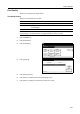
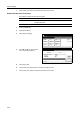
1
Press the Printer key.
Item Description
First If there is paper in the MP tray, paper is fed from the MP tray for printer output
even if another paper source has been selected. If there is no paper in the MP
tray, paper is fed from the cassette if printable paper is loaded in the cassette.
Cassette Set the MP Tray to be used like the other cassettes.
Printer menu
Print Sta-
tus Page
Interface
Emulation
Page Set
Print
Paper
RAM DI SK
Mode
Select item.
Font
Color Mode
Handling
Quality
Others
Paper Handling
Printer menu
Cassette
Change #
1st paper
Off
Tray A
Off
Setting Item
Multipurpose tray mode
Feed Select
Duplex Mode
Paper Output
Override A4/LT
Value