
User guide




4-19
Operation Panel
3
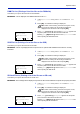
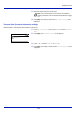
To edit the destination, press [OK].
4
Press or to select Edit.
5
Press [OK].
6
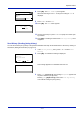
Enter the address using the numeric keys.
7
Press [OK].
8
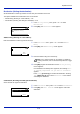
To delete the destination, press [OK].
9
Press or to select Delete.
10
Press [OK]. A confirmation message is displayed.
11
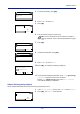
To proceed with deleting the destination, press [Yes] ([Left Select]).
Completed. appears and the account is deleted.
Pressing [No] ([Right Select]) returns to the Dest. Confirm.
menu without deleting the destination.
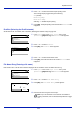
Subject (Setting job log subject)
Set the subject automatically entered when sending log histories by E-mail.
1
In the Job Log History menu, press or to select Subject.
2
Press [OK]. The Subject screen appears.
aaa@bbb.com
Edit
Delete
01
02
Address Entry:
Text
ABC
aaa@bbb.com
Note
Up to 128 characters can be entered. For details on
entering characters, refer to Character Entry Method on page
A-2.
Dest. Confirm.:
Exit
aaa@bbb.com
aaa@bbb.com
Edit
Delete
01
02
Delete.
Are you sure?
Yes
No
aaa@bbb.com
Subject:
Text
ABC