
User guide


4-9
Operation Panel
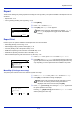
Setting a Mode Selection Menu
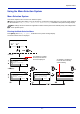
This section explains the setting procedures used for each menu item in the mode selection menu.
1
While the printer displays Ready to print., Please wait. and
Processing., press [Menu]. The mode selection menu is
displayed.
2
Each time you press or , the selection changes.
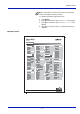
• Report...4-10
• USB Memory...4-21
• Counter...4-29
• Paper Settings...4-30
• Print Settings...4-41
• Network...4-57
• Optional Network...4-65
• Device Common...4-76
• Security...4-98
• User/Job Account...4-110
• Adjust/Maint. ...4-130
• Op Functions...4-133
Menu:
Counter
Exit
03
Paper Settings
02
01
Report
Note
Optional Network is only displayed when a
Network Interface Kit (IB-50) or Wireless Network Interface
Kit (IB-51) is installed as an option.
USB Memory is only displayed when USB memory is
installed.