
User Manual






Chapter 2 : ATVR
ATVR is a powerful and easy-to-use application which converts your PC system into a feature-rich
video/audio entertainment center. It provides users with functions to watch, record, and play analog TV on
PC.
8
2.1 System setting and channel
“Cab
ctivate
scan
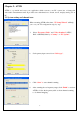
When executing ATVR at first time, “TV Setup Wizard” will help
you to set your TV configurations step-by- step.
1. Select “Frequency Table” and “Video Standard” (NTSC,
PAL or SECAM) either by “Country” or “TV System”.
2. Set frequency input source from le type”.
3. Click “Start” to start channel scanning.
4. After scanning the set frequency range, click “Finish” to a
ATVR to follow the frequency table set from channel scanning
to do channel mapping.