
User Manual





9
2.2 Setup Utility for DTVR
2.2.1 Channel Setup
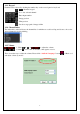
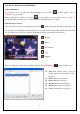
When clicking “Setting” button of Digital Basic Function, “Setup” windows will pop up.
z Add: Add TV channel manually.
z Delete: Delete TV channel from list
z Update Channel: Please select the channel you want to
see and click “Update Channel”.
z Auto Scan: Click the button to start Auto-scan function.
2.2.2 Capture Setup
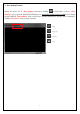
z Capture format (profile): The capture format of DVBT
is MPEG2.
z Capture location: Setup your capture folder.
z Capture filename: Setup capture file name. Choose
“ date/time ” as default filename, otherwise define
manually.
z Enable time limit: Limit recording time.