
User Manual





7
C. Time Shifting Function
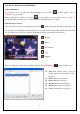
During live mode, choose “Time shifting” function by clicking on main panel or choose "Time
Shifting" on pop-up menu. When in time-shifting mode, you need to wait for a few seconds before starting
playing. While in “Time Shifting” mode, current video and time-shifting video window can be switched by
clicking "Real Screen" button on pop-up menu.
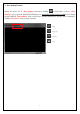
:Pause
:Backward
:Forward
:Stop