
Owner's manual




Handbook BM 100 A 67
F5 – Display Menu
This shows the gauge local display as it would be on the tank. The operating and configuration mode
functions are all available on this window and functions are made available by left-clicking on the
relevant keys below the LCD display.
Functions available:
→
“Right” key
↵
“Enter” key
↑
“Up” key
F1 – Help On-line help files
F3 – Quit Exit to real-time measurement
main window
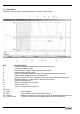
F6 – Trend Menu
Displays a real-time graph of distance from flange against time since the gauge started recording.
Functions:-
F1 – Help On-line help file
F3 – Exit Exit to real-time measurement main window
F4 – Zoom - Reduces the time scale
F5 – Zoom + Increases the time scale
F10 – Screen copy To select a directory and save the current screen as a bitmap file.