
User guide




VS-401USB - Defining the VS-401USB 4x1 USB Switcher 5
5
4 Defining the VS-401USB 4x1 USB Switcher
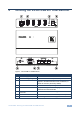
Figure 1: VS-401USB 4x1 USB Switcher
#
Feature
Function
1 HOST USB (type B) Port Connects to the host
2 DEVICE USB (type A) port Connects to a USB device (from 1 to 4)
3 PROG Button Push in for “Program” using a small screwdriver to
upgrade to the latest Kramer firmware via RS-232, or
release for “Normal” (the factory default)
4 5V DC +5V DC connector for powering the unit
5 IR Receiver The yellow LED lights when receiving signals from the
infrared remote control transmitter
6 RS-232 9-pin D-sub
Connector
Connects to a PC for firmware upgrade and control
7 DEVICE SELECT Buttons Select a device to switch to the host (from 1 to 4)
8 ON LED Illuminates green when receiving power