
Operation Manual



36
E
INSTALLING MGI PHOTOVISTA
MGI PhotoVista is an easy-to-use program that lets you create spectacular 360
0
panoramic images. When you view these panoramas, you get the experience of
being totally immersed in a realistic environment. PhotoVista’s powerful engine
quickly and automatically stitches images together, and its intuitive interface will
help even a novice to get great results in minutes.
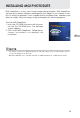
To install MGI PhotoVista:
1. Insert the CD-ROM that came with the cam-
era into the CD-ROM drive. The welcome
screen appears.
2. Click “Install MGI PhotoVista”. Follow the on-
screen instructions to complete the
installation.
• For details of how to use MGI PhotoVista to create spectacular 360
0
panoramic images, please
refer to the program’s online help.
• Windows 2000/XP users, should install and use MGI PhotoVista in “Administrator” mode.
NOTE