
- MINOLTA DiMAGE INSTRUCTION MANUAL 2300




DELETING A SINGLE IMAGE
- 79 -
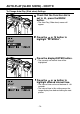
Press the or button until
the desired image appears in the
LCD monitor.
• The button scrolls forward, the button
scrolls backward.
Press the or button to
highlight “YES”.
• To cancel the delete operation, select
(highlight) “NO”.
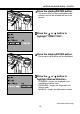
Press the display/ENTER button.
• The LCD monitor will return to the step 5
shown above after the image is deleted.
Press the flash-mode /delete
button.
• A confirmation screen will appear.
Continued on Next Page