E INSTRUCTION MANUAL
CONTENTS FOR PROPER AND SAFE USE Contents .................................... 2 For Proper and Safe Use .......... 3 GETTING STARTED Name of Parts ........................ Inserting the Battery ................ Battery Condition Indicator...... Loading the Film...................... Rewinding the Film.................. 10 14 16 17 20 BASIC OPERATION Full-auto Operation.................. Focus Lock .............................. For Close Subjects.................. Special Focusing Situations ....
FOR PROPER AND SAFE USE • Tape over lithium battery contacts to avoid short-circuiting during disposal; always follow local regulations for battery disposal. • Do not disassemble this product. Electric shock may cause injury if a high voltage circuit inside the product is touched. Take the product to a Minolta Service Facility when repairs are required.
FOR PROPER AND SAFE USE CAUTION • Do not use or store the product in a hot or humid environment such as the glove compartment or trunk of a car. It may damage the product and batteries which may result in burns or injuries caused by heat, fire, explosion, or leaking battery fluid. • If batteries are leaking, discontinue use of the product. • The lens retracts when the camera is turned off or the auto-power-off function is activated. Touching the lens barrel while it is retracting may cause injury.
FOR PROPER AND SAFE USE If this equipment does cause harmful interference to radio or television reception, which can be determined by turning the equipment off and on, the user is encouraged to try to correct the interference by one or more of the following measures: • Reorient or relocate the receiving antenna. • Increase the separation between the equipment and the receiver. • Connect the equipment to an outlet on a circuit different from that to which the receiver is connected.
NAME OF PARTS BODY For information on specific parts, refer to the page numbers shown in parenthesis.
NAME OF PARTS DATA PANEL Only the necessary indicators will appear on the data panel.
INSERTING THE BATTERY Your camera uses one 3-volt CR123A or DL123A lithium battery. 1. Open the battery-chamber door by sliding the battery-chamber release in the direction indicated. 2. Insert the battery matching the positive terminal mark inside the battery chamberdoor, then click the door closed. • Quartz-date model: The date and time must be reset (p.50). • When changing batteries, make sure the main switch is off.
BATTERY CONDITION INDICATOR Each time the camera is turned on, a symbol will appear on the data panel to indicate the power status of the battery. LOADING THE FILM 1. Slide the back-cover release down to open the back cover. Briefly appears. Power is sufficient for all camera operations. Power is sufficient, but the battery must be replaced soon. Replace the battery. The shutter will lock until the battery is replaced.
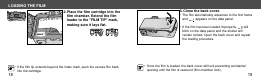
LOADING THE FILM 2. Place the film cartridge into the film chamber. Extend the film leader to the "FILM TIP" mark, making sure it lays flat. • If the film tip extends beyond the index mark, push the excess film back into the cartridge. 18 3. Close the back cover. • The film automatically advances to the first frame and appears on the data panel. • If the film has been loaded improperly, will blink on the data panel and the shutter will remain locked. Open the back cover and repeat the loading procedure.
REWINDING THE FILM Your camera automatically rewinds the film after the last exposure is taken. When blinks on the data panel, open the back cover and remove the film. • Do not open the back cover until the rewind motor stops. Never use force. • If the rewind motor stops before the film has been completely rewound, all the indicators will blink. Remove and insert the battery or press the manual-rewind button.
REWINDING THE FILM MANUAL REWIND To rewind before the end of the roll, turn the camera on and gently press the manual rewind bottun using the button key on the strap. SILENT REWIND This camera has a silent-rewind function to minimize the noise of film rewinding. Use the silent-rewind mode when the rewinding noise would be distracting such as during a wedding ceremony. Press the manual-rewind button while the film is rewinding. Press the button again to return to normal winding speed.
FULL-AUTO OPERATION 1. Press the main switch to turn the camera on. BASIC OPERATION • Auto Power Off: To conserve power, the camera automatically turns off if it is not operated for more than 8 minutes. • Do not obstruct or hold the lens barrel. 2. Hold the camera steady, making sure your fingers do not cover the flash, lens, or AF windows. • As shown, for vertically framed pictures, turn the camera so the flash is on top. Continued on next page.
FULL-AUTO OPERATION 3. Look through the viewfinder and push the zoom lever (T) to zoom in or (W) to zoom out. 4. Place the focus frame on the subject and press the shutter-release button partway down. Ready Lamp The ready lamp will light to indicate the status of the camera. T(elephoto) : zoom in W(ide angle) : zoom out 26 On: Focus locked Off: Flash charging Blinks quickly: Subject is too close Blinks slowly: Camera shake warning Continued on next page.
FOCUS LOCK FULL-AUTO OPERATION 5. When the green ready lamp glows, press the shutter-release button all the way down to take the picture. • Press the shutter-release button with slow, steady pressure. • The film automatically advances to the next frame. • After use, press the main switch to turn the camera off. Subjects outside the focus frame may not be in focus. Use focus lock to ensure accurate focusing. 1. Place the focus frame on your subject. • The flash will fire automatically in low-light (p.
FOR CLOSE SUBJECTS FOCUS LOCK 2. Press and hold the shutter-release button partway down until the green ready lamp glows indicating focus lock. When taking a picture with the subject closer than 1.5m (4.9ft.), the viewfinder image and the actual film image will be different. The difference increases as the subject becomes closer, or especially when using the telephoto setting. At the closest range at the telephoto settings, the top of the actual film image is located below the close framing guide.
FOR CLOSE SUBJECTS • If the green ready lamp blinks rapidly and the shutter locks, the subject is too close. Be sure your camera-to-subject distance is at least 60cm (2.0 ft.) in the wide-angle setting or 55 cm (1.8 ft.) in the telephoto setting. • When taking pictures at extremely close distances, the green ready lamp may blink slowly, but the focus may not be accurate. CLOSE FRAMING GUIDE If the subject is closer than 1.5m(4.9ft.), take the following steps: 1.
SPECIAL FOCUSING SITUATIONS Some scenes or subjects are difficult for the autofocus system to lock on to. When the focus will not lock, focus lock (p. 29) on another object the same distance from you as the main subject, recompose, then take the picture. The autofocus may not lock on the following; • Bright light sources such as the sun or neon lights. • Highly reflective surfaces such as water or mirrors. • Flames or fireworks. • Dark objects and surfaces with low reflectances.
SELECTING FLASH-MODE Flash cancel (p. 43) Press the flash-mode button until the desired indicator appears on the data panel. The following mode can be selected: Auto-depth (p. 44) Night portrait (p. 46) Autoflash (p. 39) Landscape/Night View (p. 47) Autoflash with red-eye reduction (p. 40) Fill flash (p. 42) 36 • The autoflash and the autoflash with red-eye reduction will remain selected after you turn the camera off.
FLASH RANGE AUTOFLASH The range of the built-in flash depends on the film speed and focal length you are using. To ensure proper exposure, make sure your subject is positioned within the flash range. Focal length Film speed 37.5mm 115mm W(ide-angle) T(elephoto) ISO100 0.6- 5.1m 2.0- 16.7f t . 0.55- 2.1m 1.8- 6.9f t . ISO400 0.6- 10.2m 2.0- 33.5f t . 0.55- 4.3m 1.8- 14.1f t . These distances are recommended with color negative film. 38 The flash will fire automatically in low-light.
AUTOFLASH WITH RED-EYE REDUCTION Use the reduction mode to reduce the red-eye effect when photographing people or animals in low-light situations. The red-eye reduction lamp will blink three times before the main flash will fire. Press the flash-mode button until appears on the data panel, then take the picture. • Warn your subject not to move while the lamp is blinking just before the picture is taken.
FILL FLASH FLASH CANCEL The flash will fire when the shutter is released regardless of lighting. Use the fill flash to reduce harsh shadows on your subject's face. Also the use in back-lit situations is recommended. The flash will not fire in this mode. Use the flash cancel when you want to photograph subjects that are beyond the flash range or to capture the ambiance of the existing light. Press the flash-mode button until appears on the data panel, then take the picture.
AUTO-DEPTH The auto-depth is used for taking pictures with both foreground subjects and background subjects in sharp focus. Use this mode when taking portraits where the surrounding landscape is also important. • The flash will fire automatically in low-light. • If the autoflash with red-eye reduction was chosen previously, the autodepth mode will also use the red-eye reduction. • Sharpness of the background depends on brightness and focal length.
NIGHT PORTRAIT LANDSCAPE/NIGHT VIEW In the night portrait mode, the camera balances the flash and existing light exposures so you can take beautiful pictures of people at sunset or at night. Press the flash-mode button until appears on the data panel, then take the picture. • The fill flash with red-eye reduction will be set. • Shutter speed will be slow. Use of a tripod is recommended and warn your subjects not to move. 46 The flash will not fire in this mode and the focus is set to infinity.
SELF-TIMER The self-timer delays release of the shutter for approximately 10 seconds after the shutter-release button is pressed. 1.Place the camera on a tripod, then press the drive-mode button until the self-timer symbol appears on the data panel. 2. Place the focus frame on your subject. • Use focus lock for off-center subjects (p 29). 48 3. Press the shutter-release button all the way down; the self-timer delays release for 10 seconds. • will blink on the data panel.
FOR OWNERS OF THE QUARTZ-DATE MODEL Turn the camera on, then press the date button to choose the data imprinting format. IMPRINTING THE DATE OR TIME This feature enables you to record the date or time onto the lower-right portion of the picture. Buttons for date function Select button The display will change as follows : DATE Adjust button Date button • Since the date is recorded when the film is advanced to the next frame, sometimes the last frame of the roll will not have a data print.
FOR OWNERS OF THE QUARTZ-DATE MODEL SETTING THE DATE OR TIME This camera has a quartz clock and automatic calendar through the year 2029. 1. Press the main switch to turn the camera off, then press the date button to display the date. 2. Press the select button until the item you want to adjust blinks. • The next item will blink each time the select button is pressed. YEAR stops blinking 52 MONTH MINUTES DATE HOURS 3. Press the adjust button to change the blinking item.
FOR OWNERS OF THE QUARTZ-DATE MODEL CHANGING THE FORMAT The order of year/month/day can be changed. 4. Press the adjust button to change the display format. 1. Press the main switch to turn the camera off. 2. Press the date button to display the date. The format sequences as follows: `Y M D 3. Press and hold the select button until all items on the date display blink. M D`Y D M`Y 5. Press the select button until all items stop blinking to set the updated information.
ATTACHING THE CAMERA STRAP Attach the strap as shown. APPENDIX BUTTON KEY • The button key is included on the strap. Use the key to push the manual-rewind button (p.22).
CARE AND STORAGE OPERATING TEMPERATURE AND CONDITIONS • This camera is designed for use from -10 to 40 °C (14 to 104 °F). • Never leave your camera where it may be subjected to extreme temperatures such as in the glove compartment of a car. • At colder temperatures, the data panel response time will be slow. At higher temperatures, the display will temporarily darken, but will be restored when the temperature normalizes. • Never subject the camera to extreme humidity.
CARE AND STORAGE • Never place lens fluid directly on the lens. • Never touch the lens surface with your fingers. • Never use alcohol or solvents to clean the camera. BEFORE IMPORTANT EVENTS • Check camera operation carefully or take test photographs. • Minolta is not responsible for any loss which may occur due to an equipment malfunction.
TECHNICAL SPECIFICATIONS Camera Type: Lens: 35mm lens-shutter camera 37.5-115mm f/5.4 - 10.9 lens 6 element/6 group construction Focusing Range:(W): 0.6m - ∞ (2.0 - ∞) (T): 0.55m - ∞ (1.8 - ∞) Film Speed: Settings Automatic for DX-coded film. Non-DX coded film seto to ISO100. Range ISO 25 to 3200 Metering Range (ISO 100): Wide: Ev 3 - 16 Tele: Ev 3.7 - 16 Shutter Speed: 10 - 1/390 sec. Flash Range (ISO 100): Wide: 0.6 - 5.1m (2.0 - 15.2 ft.) Tele: 0.55 - 2.1m (2.8 - 6.6 ft.
Minolta Co., Ltd. Minolta Europe GmbH Reparatur/Repair Minolta France S.A.S. Minolta (UK) Limited Minolta Austria Ges. m.b.H. Minolta Camera Benelux B.V. Belgian Branch Minolta (Schweiz) AG Minolta Svenska AB Finnish Branch Minolta Portugal Limitada Minolta Corporation Minolta Canada Inc. Minolta Hong Kong Limited Minolta Singapore (Pte) Ltd. Shanghai Minolta Optical Products Co., Ltd.