
User manual


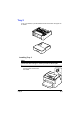


Table Of Contents
- magicolor 1650EN
- Contents
- Ch.1 Introduction
- Ch.2 Using the Printer Driver
- Ch.3 Using the Status Monitor (Windows Only)
- Ch.4 Printer Control Panel and Configuration Menu
- Ch.5 Media Handling
- Ch.6 Replacing Consumables
- Ch.7 Maintaining the Printer
- Ch.8 Troubleshooting
- Ch.9 Installing Accessories
- Appendix

Duplex Option 9-7
1 Turn off the printer and discon-
nect the power cord and inter-
face cables.
2 Remove the dust cover from
Tray 1.
Close Tray 1 and the output tray.
3 Prepare the attachment.
" Be sure to place the attachment on a level surface.
4 Lift the printer and place it on top
the attachment, making sure that
the positioning pins on the
attachment correctly fit into the
holes on the bottom of the
printer.
5 Open Tray 1 and reattach the dust cover.
Next, install the duplex option.