
User manual


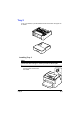


Table Of Contents
- magicolor 1650EN
- Contents
- Ch.1 Introduction
- Ch.2 Using the Printer Driver
- Ch.3 Using the Status Monitor (Windows Only)
- Ch.4 Printer Control Panel and Configuration Menu
- Ch.5 Media Handling
- Ch.6 Replacing Consumables
- Ch.7 Maintaining the Printer
- Ch.8 Troubleshooting
- Ch.9 Installing Accessories
- Appendix

Tray 29-4
2 Remove the dust cover from Tray 1.
Close Tray 1 and the output tray.
3 Prepare Tray 2.
" Be sure to place Tray 2 on a level surface.
4 Lift the printer and place it on top
of Tray 2, making sure that the
positioning pins on Tray 2 cor-
rectly fit into the holes in the bot-
tom of the printer.
5 Open Tray 1 and reattach the dust cover.
6 Load paper into Tray 2.
For details on loading paper, refer to “Tray 2” in “Loading Plain Paper” on
page 5-18.
7 Insert Tray 2 into the printer.
8 Reconnect all interface cables.