
User manual


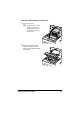


Table Of Contents
- magicolor 1650EN
- Contents
- Ch.1 Introduction
- Ch.2 Using the Printer Driver
- Ch.3 Using the Status Monitor (Windows Only)
- Ch.4 Printer Control Panel and Configuration Menu
- Ch.5 Media Handling
- Ch.6 Replacing Consumables
- Ch.7 Maintaining the Printer
- Ch.8 Troubleshooting
- Ch.9 Installing Accessories
- Appendix

Clearing Media Misfeeds 8-13
Clearing a Media Misfeed From Tray 1
1 Remove the dust cover from
Tray 1.
2 Carefully pull out the misfed
media.
" If the media cannot be
removed, instead of pull-
ing it with extreme force,
clear the media misfeed
according to the proce-
dure described in “Clear-
ing a Media Misfeed in
the Printer” on page 8-7.
3 Reattach the dust cover.
4 Press the Menu Select key.