
User manual


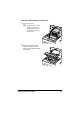


Table Of Contents
- magicolor 1650EN
- Contents
- Ch.1 Introduction
- Ch.2 Using the Printer Driver
- Ch.3 Using the Status Monitor (Windows Only)
- Ch.4 Printer Control Panel and Configuration Menu
- Ch.5 Media Handling
- Ch.6 Replacing Consumables
- Ch.7 Maintaining the Printer
- Ch.8 Troubleshooting
- Ch.9 Installing Accessories
- Appendix

Clearing Media Misfeeds8-8
Note
Do not touch the PC drum and the transfer belt on the imaging
cartridge.
Position the removed imaging
cartridge as shown in the
illustration at the right.
Be sure to keep the imaging
cartridge horizontally horizontal
and place it where it will not
become dirty.
Do not leave the imaging
cartridge removed for more than
15 minutes, and do not place the
removed imaging cartridge in a
location where it would be
exposed to direct light (such as
sunlight).