
User manual


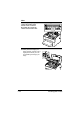

Table Of Contents
- magicolor 1650EN
- Contents
- Ch.1 Introduction
- Ch.2 Using the Printer Driver
- Ch.3 Using the Status Monitor (Windows Only)
- Ch.4 Printer Control Panel and Configuration Menu
- Ch.5 Media Handling
- Ch.6 Replacing Consumables
- Ch.7 Maintaining the Printer
- Ch.8 Troubleshooting
- Ch.9 Installing Accessories
- Appendix

Cleaning the Printer7-14
Note
Decreased print quality may
result if the surface of the
transfer roller is touched.
Be careful not to touch the
surface of the transfer roller.
8 Slowly insert the imaging car-
tridge vertically, and then push it
slightly down toward you to fin-
ish reinstalling the imaging car-
tridge.