
User manual

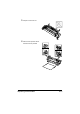




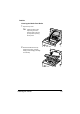
Table Of Contents
- magicolor 1650EN
- Contents
- Ch.1 Introduction
- Ch.2 Using the Printer Driver
- Ch.3 Using the Status Monitor (Windows Only)
- Ch.4 Printer Control Panel and Configuration Menu
- Ch.5 Media Handling
- Ch.6 Replacing Consumables
- Ch.7 Maintaining the Printer
- Ch.8 Troubleshooting
- Ch.9 Installing Accessories
- Appendix

Cleaning the Printer 7-5
Interior
Cleaning the Media Feed Roller
1 Open the top cover.
" If there is paper in the
output tray, remove it,
and then fold up the out-
put tray before opening
the top cover.
2 Grab the handle and lift it up
slightly to the back, and then
slowly pull the imaging cartridge
out vertically.