
User's guide zoom digital camera EasyShare C653, EasyShare C623


Taking pictures/videos
www.kodak.com/go/support
11
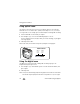
Using the flash
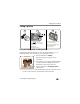
Use the flash when you take pictures at night, indoors, or outdoors in heavy shadows.
Flash-to-subject distance
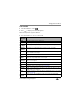
Zoom position Flash distance
Wide angle 2–11.5 ft (0.6–3.5 m) @ ISO 200
Telephoto 2–6.6 ft (0.6–2.0 m) @ ISO 200
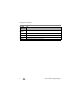
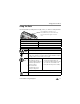
Flash modes Flash fires
Auto
Flash
When the lighting conditions require it.
Fill Every time you take a picture, regardless of the lighting conditions. Use when
the subject is in shadow or is “backlit” (when the light is behind the subject).
In low light, hold the camera steady or use a tripod.
Red-
eye
If Red-eye Pre-flash is turned off:
■ The flash fires twice (to
evaluate lighting conditions;
and then again when the
picture is taken).
■ The camera then
automatically corrects
red-eye in the picture.
If Red-eye Pre-flash is turned on:
■ The flash fires multiple times (for
focusing in low-light conditions; for the
eyes to become accustomed to the
flash; and when the picture is taken).
To turn the Red-eye Pre-flash feature on/off, see page 37.
Off Never.
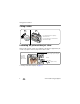
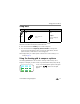
Press the
The current flash mode appears in the LCD
screen.
button repeatedly to scroll
through flash modes (see Flash modes below).