
User's Guide Digital Camera C530, C315, CD50




Table Of Contents
- Front cover
- Product features
- Table of contents
- 1Setting up your camera
- 2Taking pictures and videos
- 3Transferring and printing pictures
- Installing the software
- Transferring pictures with the USB cable
- Printing pictures
- Dock compatibility for your camera
- 4Doing more with your camera
- Using the self-timer
- Running a slide show
- Copying pictures and videos
- Choosing a flash setting
- Changing picture-taking settings
- Customizing your camera
- Viewing picture/video information
- Pre-tagging for album names
- Sharing your pictures
- 5Troubleshooting
- 6Getting help
- 7Appendix
- Index
30 www.kodak.com/go/support
Doing more with your camera
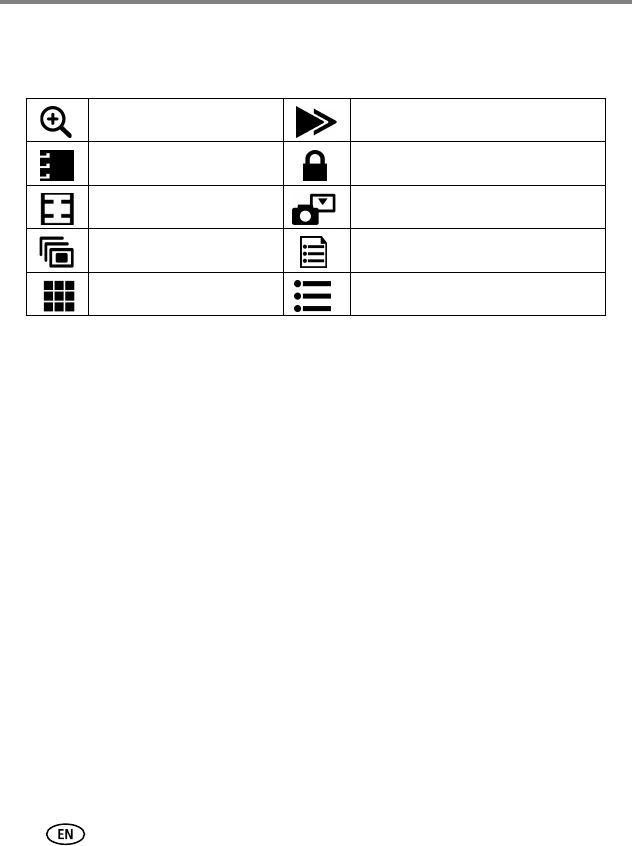
Changing optional review settings
In Review mode, press the Menu button to access optional review settings.
Pre-tagging for album names
Use the Set Album (Still or Video) feature to pre-select album names before you take
pictures or videos. Then, all the pictures or videos you take are tagged with those
album names.
First—on your computer
Use Kodak EasyShare software to create album names on your computer. Then copy
up to 32 album names to the album name list on your camera the next time you
connect the camera to the computer. See Kodak EasyShare software Help for details.
Magnify (pictures) (page 10)Copy (page 23)
Album (page 30) Protect (page 12)
Crop (page 11) Image Storage (page 26)
Slide Show (page 21) Picture/Video Information (page 29)
Multi-up (page 10) Setup Menu (page 27)