
User's Guide Digital Camera C530, C315, CD50

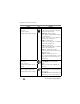



Table Of Contents
- Front cover
- Product features
- Table of contents
- 1Setting up your camera
- 2Taking pictures and videos
- 3Transferring and printing pictures
- Installing the software
- Transferring pictures with the USB cable
- Printing pictures
- Dock compatibility for your camera
- 4Doing more with your camera
- Using the self-timer
- Running a slide show
- Copying pictures and videos
- Choosing a flash setting
- Changing picture-taking settings
- Customizing your camera
- Viewing picture/video information
- Pre-tagging for album names
- Sharing your pictures
- 5Troubleshooting
- 6Getting help
- 7Appendix
- Index

26 www.kodak.com/go/support
Doing more with your camera
Picture Size
(Auto mode)
Set picture resolution.
This setting remains until you change it.
5.0 MP (default)—for printing up to
20 x 30 in. (51 x 76 cm); pictures are highest
resolution and largest file size.
4.4 MP (3:2)—ideal for printing
4 x 6 in. (10 x 15 cm) prints without cropping.
Also for printing up to
20 x 30 in. (51 x 76 cm); some cropping may
result due to the 3:2 aspect ratio.
4.0 MP—for printing up to
20 x 30 in. (51 x 76 cm); pictures are medium
resolution with smaller file size.
3.1 MP—for printing up to
11 x 14 in. (28 x 36 cm); pictures are medium
resolution with smaller file size.
2.1 MP—for printing up to 8 x 10 in.
(20 x 25 cm); pictures are medium resolution
with smaller file size.
1.1 MP—for printing up to 4 x 6 in.
(10 x 15 cm); for emailing, Internet, or screen
display; pictures are lowest resolution and
smallest file size.
Color Mode
(Auto mode)
Choose color tones.
This setting remains until you turn the
Mode dial.
Color (default)—for color pictures.
Black & White—for black-and-white
pictures.
Sepia—for pictures with a reddish-brown,
antique look.
Image Storage
Choose an image storage location.
This setting remains until you change it.
Auto (default)—the camera uses the card if
one is in the camera. If not, the camera uses
internal memory.
Internal Memory—the camera always uses
internal memory, even if a card is installed.
Setting Icon Options